Exploring the switchover temperatures from Heat Pumps to fossil-fuel backup in a “partial-displacement” or “dual-fuel” setup.
Guest Writer: Jason P.
This winter (2025/2026) is much colder than my first two, and since my electrical rates have climbed 27% and propane 18% since installation, I got curious if I should revisit the temperature at which my system should switch over from heat pumps to propane boiler.

This post was guest written by Jason P., a Jay Moody HVAC customer, sharing his firsthand experience and perspective.
I’m a professional nerd by trade and I’ve been exploring how AI tools can help, so I took this question to Claude.ai and ChatGPT. I found that my optimal switchover temperature based on my unique home & HVAC system was significantly different than the generic guidance suggested!
You can do this too, no spreadsheets required! And you can revisit periodically as electric rates and fuel prices fluctuate.
Mass Save has a calculator that provides general guidance that propane backup systems shouldn’t come on until outdoor temperatures are less than 5ºF.
Oil, and natural gas have higher max switchover temperatures of 30ºF, but if you put in your current electricity and fuel rates, it may suggest a lower switchover temperature.
Utility rates & fuel costs are major drivers, but the study makes some key assumptions that may not match your unique system:
Your unique system is likely different than the generic systems they modeled, potentially very different.

For example, my 95% efficient propane boiler has very different economics than the 77% efficient boiler Mass Save assumed—this alone shifts the economic switchover by 10º-15ºF.
Also, you may need to switch over at higher temperatures based purely on capacity—whether your heat pump can deliver enough heat—regardless of electricity vs. fuel costs. Heat pump performance declines as temperatures drop, and every unit degrades at different rates—the colder it gets, the more units vary from the Mass Save average.
The easy-to-find data points you need:
With this information, you have enough to use the Mass Save calculator and get a generic baseline suggestion… But if you want to account for your unique system and your unique heat load, you’ll need to find some additional data points for the AI to help you crunch your specific numbers:
These factors—your heat pump’s fall-off rate, your home’s heat load, and your backup system’s efficiency—drive switchover thresholds different from generic guidance.
The format of the performance table can vary by manufacturer.
If searching for the documentation is daunting, just give the AI your indoor & outdoor unit model numbers and it can look them up. However, the AI will burn through its limits fast if it has to search through dozens of PDF pages to find the one table it needs. Paying for a premium AI plan is one option; but the free plan works if you give the AI just the single table it needs, instead of the entire product manual.
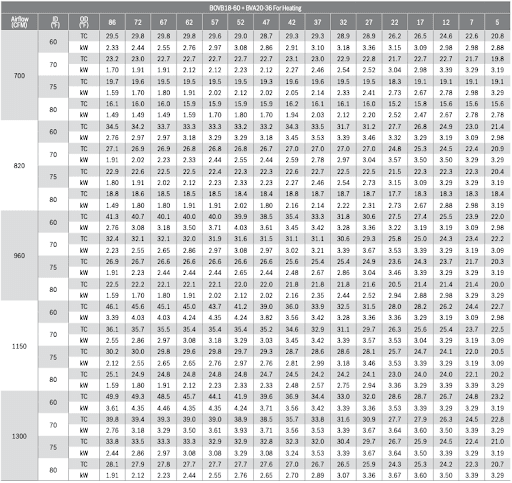
For example, my Bosch specs include tables for different condenser/air handler combinations. I needed the make/model for both units to find the right table, shown below. Look for Indoor Temperature (“ID”), Outdoor Temperature (“OD”), power consumption (“kW”), and BTU output (“TC” for Total Capacity, in thousands of BTUs). My table also shows different airflow volumes–I just needed to recognize that this is the table for my condenser/air handler combination and give the AI just this one table.
My Mitsubishi mini-split table looks different but shows the same data—power (W) and BTU output by outdoor temperature:
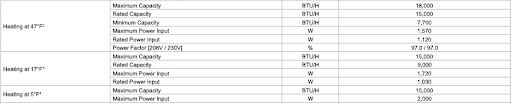
This example makes it easy to see the fall-off that was mentioned earlier… i.e. at 47º it delivers 18,000 BTUs of capacity at 1.12kW; but at 5º it drops to 15,000 BTUs and increases to 2kW (i.e. burning more electricity but delivering less heat).
Once you’ve gathered your $-rates and system info, you’re ready for the AI to do the heavy lifting! The AI will help you answer two questions:
Providing the AI more information at once helps you use fewer tokens against your AI plan’s limits (i.e. one long post is better than individual messages for each detail). Tell the AI the basic design of your HVAC system, and the inputs outlined above.
An example prompt might be:
I have a dual-fuel heating system. I use a Bosch air-sourced central heat-pump. I use a Viessmann high-efficiency propane boiler for domestic hot water and as backup heat when it gets too cold for the heat-pumps. The backup heat from the boiler is via a hydrocoil in the central air handler (not baseboard radiators, not electric heat strips).
I would like to know at what outdoor temperatures my system can no longer provide enough heating capacity and should switch over from heat pump to boiler.
I also want to know at what outdoor temperature propane becomes cheaper than running the heat pump, and therefore should switch over to the boiler based on economics (as opposed to capacity).
Electric rate: $x.xx/kWh
Propane: $x.xx/gallon
Heat Pump model numbers:
Bosch BOVB-60HDN1-M18M Condenser
Bosch BVA-36WN1-M20 Air Handler
The performance table for kW power consumption and BTU capacity by indoor/outdoor temperature is attached.
Boiler:
Viessmann Vitodens 100-W B1HE-199 Boiler with Vitocell 300V EVIB 79 Indirect Tank for domestic hot water.
Aquecoil Hydro Coil HHU-AM-2 for Bosch 2-3 Ton air handlers
AFUE Efficiency Rating 95%
My Manual J Heat Load is xx,xxx BTUs at xº outdoor temperature.
If you have multiple heat pumps, or spaces not heated by them, include those details too—for example, my basement is heated by boiler-fed radiators, and the bonus room over the garage has a separate mini-split.
From here, the AI takes over. It may explain its Cost-per-BTU arithmetic or mention break-even COP, but what matters is the output: a Capacity cutover temperature and an Economic cutover temperature.
For example, one of my heat pumps has capacity down to -13ºF, but due to my boiler being so efficient (compared to the Mass Save assumptions), it is more economical to switch over to propane around 10º-15º.
It also determined that my other heat pump has a capacity floor around 10º-15ºF, and at those temps it is burning so much electricity, and my boiler is so efficient, that switching over around 20º-25ºF makes sense.
While my thermostat was set to cutover at 5º, my heat pump was running a long time and barely holding temperature. After the AI identified a capacity floor of 10º-15ºF based on the Manual J heat load and the heat pump’s performance table, I decided to also give it my thermostat’s real-world data.
Ecobee logs outdoor temp, indoor temp, and system runtime in 5-minute increments. I exported data from last winter (which had single-digit and negative temps) plus a recent cold stretch in December. I didn’t have to clean up or normalize the data for analysis, I just fed it the raw CSV export.
It only took the AI a few minutes to confirm a practical capacity floor at about 10º-15º where the system runs constantly without increasing the indoor temperature. The real-world performance data supplementing the technical documentation validated the 15º capacity-based switchover, as opposed to the 5º generic guidance.
Once you have these thresholds, you can change the settings in your thermostat so that you aren’t spending more than you need to on either electricity or fossil fuels.
If your fossil-fuel system’s efficiency is more in line with the generic Mass Save model, then your economic switchover temp is likely significantly lower than my example, but you’ll still need to compare that with your actual system capacity; i.e. if your capacity is at 15º and your economic switchover is 0º, you’ll set your switchover at your 15º capacity limit.
Heat pumps have significantly lower CO2 emissions per BTU than fossil fuel systems, even at negative temperatures. If you would rather optimize for your carbon footprint than economics, then set your threshold at your uniquely calculated system capacity, even if the economic switchover is higher. Your system’s capacity may even be better than the generic Mass Save Calculator – if so, you can run your heat pump even colder and reduce your carbon emissions further.
The AI can help estimate cost differences between switchover temperatures; e.g. the incremental cost difference between a switchover at 15º vs 5º may offer only modest savings, and you may choose to prioritize carbon footprint over marginal costs. Either way, you are now making a data-informed decision based on your unique system, instead of generic guidance.
Now the AI knows the specs of your unique system. Your capacity-based switchover point based on your heat pump & boiler/furnace efficiency won’t change much over time, but the economic switchover can fluctuate wildly based on changes in rates. With this task saved in your AI profile, you can come back to it again next winter with updated electricity and fuel prices and simply tell the AI: “Here are my current rates… What is my new switchover temperature this year?”
¹Guidehouse Inc., “Heat Pump Switchover Temperature Optimization Study Memo,” memorandum to the Massachusetts Program Administrators, September 2, 2022, https://ma-eeac.org/wp-content/uploads/Heat-Pump-Switchover-Temperature-Optimization-Study-Memo_2Sept2022_Final.pdf outlines their methodology for determining the cost-per-BTU (heating energy) for different HVAC systems like heat pumps vs furnaces or boilers fueled by propane or natural gas or oil.
²Guidehouse Inc., “Heat Pump Switchover Temperature Optimization Study Memo,” memorandum to the Massachusetts Program Administrators, September 2, 2022, https://ma-eeac.org/wp-content/uploads/Heat-Pump-Switchover-Temperature-Optimization-Study-Memo_2Sept2022_Final.pdf , see pages 13-14 for Carbon Emissions data.
Whether you’re looking for reliable HVAC, electrical or plumbing services,
we’re here to help!
"*" indicates required fields
